
Why our docker push failed behind Cloudflare, and how we moved the registry off the tunnel
Cloudflare caps proxied request bodies at 100 MB on Free and Pro plans, which breaks large image pushes. Here is how we served our Zot registry directly from the VPS instead.
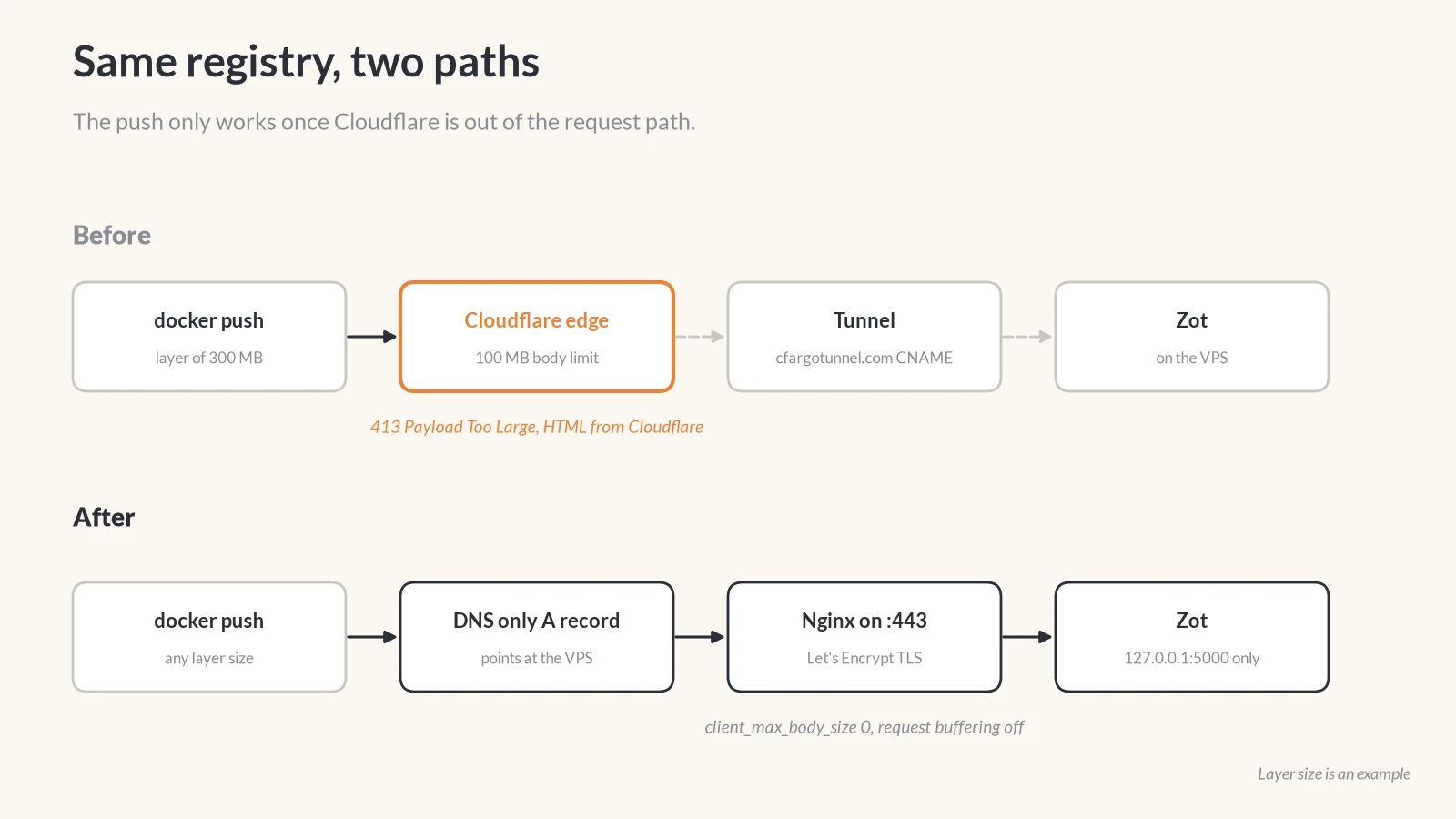
We run our own container registry, Zot (opens in a new tab), on a VPS. It sat behind a Cloudflare Tunnel like the rest of our self-hosted apps, and that worked until we pushed an image with a large layer. The push died with a 413 Payload Too Large, and the error body was a Cloudflare HTML page, not anything from Zot.
The fix was to take one hostname, registry.scalarloop.com, out of Cloudflare’s request path entirely and let Nginx on the VPS serve it. This note covers why that was the right call, the four changes that actually move the traffic, and the checks we run to prove it.
The limit is in the plan, not in Zot
Cloudflare caps the size of a proxied request body by plan. Its docs list 100 MB on Free and Pro, 200 MB on Business, and up to 5 GB on Enterprise (opens in a new tab). A Docker push sends each image layer as a request body, so any layer over the cap gets rejected at the edge before your registry ever sees it.
Cloudflare’s own suggestions are to split uploads into smaller chunks, upgrade the plan, or switch the record to DNS only. We don’t control how the Docker client chunks layers, and paying for a bigger plan to move our own images felt wrong. DNS only it was.
There is a second, separate trap worth knowing about. In 2025, cloudflared had a bug that dropped streamed request bodies (opens in a new tab) that arrived without a Content-Length header, which is exactly how Docker sends some blob uploads. That one has since been fixed, but it is a good reminder that a registry is a heavier HTTP client than most web apps, and every proxy in the path is one more thing that can get in its way.
Turning the cloud grey is not enough
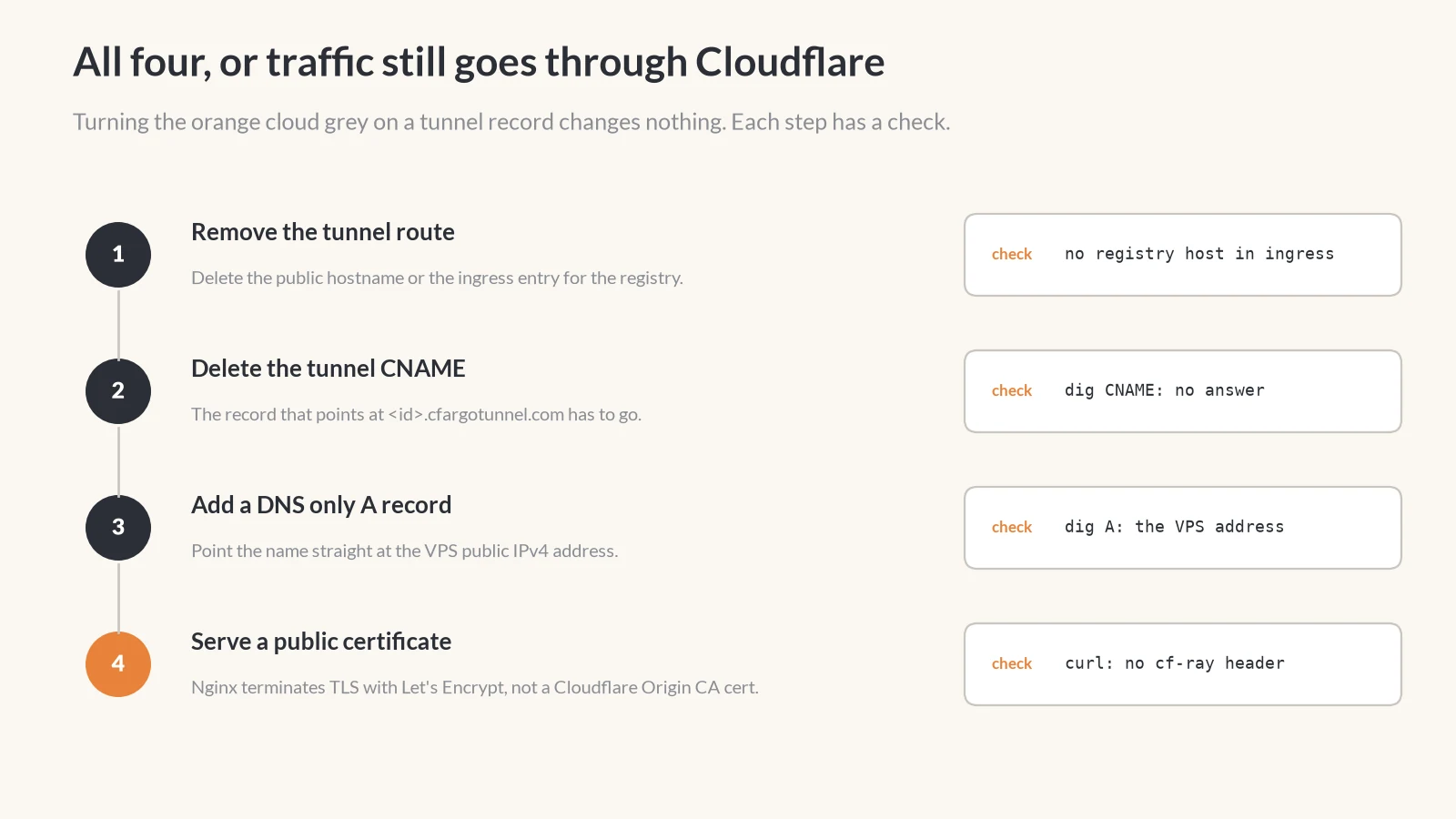
This is the part that is easy to get wrong. A tunnel hostname is a CNAME to <tunnel-id>.cfargotunnel.com. If you flip that record from proxied to DNS only, the name still resolves to Cloudflare’s tunnel, so the traffic still goes through Cloudflare. Nothing changes.
Traffic only leaves Cloudflare when all four of these are true:
- The registry hostname is removed from the tunnel’s public hostnames, or from the
ingresslist in a localcloudflaredconfig. Keep the finalhttp_status:404fallback and every other hostname. - The tunnel CNAME for the registry is deleted.
- A new
Arecord points the name at the VPS’s public IPv4 address, with proxy status set to DNS only. - The VPS terminates TLS itself with a publicly trusted certificate.
The fourth one is easy to miss. If you were using a Cloudflare Origin CA certificate behind the tunnel, it stops working the moment clients connect directly, because only Cloudflare trusts it. We issued a Let’s Encrypt certificate with Certbot instead.
The Nginx block that lets big layers through
On the VPS, Zot listens only on 127.0.0.1:5000, never on 0.0.0.0. Nginx is the only public entry point. The settings that matter for a registry are the body size and buffering:
server {
    server_name registry.scalarloop.com;

    # Image layers can be far larger than a normal upload.
    client_max_body_size 0;

    location / {
        proxy_pass http://127.0.0.1:5000;
        proxy_http_version 1.1;
        proxy_set_header Host $http_host;
        proxy_set_header X-Forwarded-Proto $scheme;

        # Stream uploads to Zot instead of spooling them to disk first.
        proxy_request_buffering off;
        proxy_buffering off;
        proxy_send_timeout 900s;
        proxy_read_timeout 900s;

        add_header Docker-Distribution-Api-Version "registry/2.0" always;
    }
}
client_max_body_size 0 removes Nginx’s own upload cap, which defaults to 1 MB. If you skip it, you swap Cloudflare’s 413 for an Nginx 413, and the fix is just as confusing the second time.
One more thing tripped us up on this box: the ports were already taken. An old Coolify install had its Traefik proxy bound to 80 and 443. We stopped those containers, kept their data until everything else was verified, and only then started Nginx. sudo ss -ltnp | grep -E ':(80|443)\s' tells you who owns the ports before you go hunting.
Prove Cloudflare is gone
These are the checks we run after the cutover. They are safe to paste into any terminal and swap in your own hostname:
HOST=registry.scalarloop.com

# Should print nothing: no CNAME left in the chain.
dig +short "$HOST" CNAME

# Should print your VPS address, not a Cloudflare one.
dig +short "$HOST" A

# Use GET, not HEAD. Zot can answer HEAD /v2/ with 405 even when healthy.
curl -sS -D - -o /dev/null "https://$HOST/v2/" |
  grep -Ei 'server:|cf-ray|docker-distribution|www-authenticate'
For a registry with authentication turned on, the last command should show a 401 Unauthorized with a Www-Authenticate: Basic realm="zot" header and a Docker-Distribution-Api-Version header. It should not show a cf-ray header or server: cloudflare. If either appears, something in the DNS chain still points at Cloudflare.
The real test is a push and a pull from a second machine. Log in with --password-stdin so the password never lands in shell history.
What you give up
Going direct removes Cloudflare’s WAF, DDoS protection, analytics and IP masking for that one hostname, and the VPS address becomes public. For us that trade was fine. The registry requires login, the only open ports are 80 and 443, and Zot is bound to loopback. Cloudflare is still our DNS provider for everything.
If you need to undo it, the rollback is the same four steps in reverse: restore the tunnel hostname, swap the A record back to the tunnel CNAME, and wait for DNS. The 100 MB limit comes back with it.
The short version
If docker push fails with a 413 and the error page looks like Cloudflare, the limit is your plan, not your registry. Give the registry its own DNS only record, terminate TLS on the server with a public certificate, set client_max_body_size 0 and turn off request buffering in Nginx. Then check for cf-ray to be sure the change actually took.