
Most of our AI traffic doesn't need a frontier model, and here's how our proxy decides
Many AI requests are small, well-defined jobs. Here is how a Bifrost proxy can match each one to a model tier and escalate only when a check fails.

A lot of what software asks a language model to do is small and well defined: pull three fields out of a message, label a ticket, rewrite a sentence, answer a question from a short context. A small, fast model handles jobs like these well. The frontier model is for work that needs it, and the decision about which model gets which request can live in one place, the AI proxy. We run Bifrost as ours.
This note covers the pattern we follow: the signals worth checking, the order to check them in, and what to do when a small model gets something wrong.
Why one model for everything is the wrong default
Sending every call to the strongest model is simple, and it works. It also means a short extraction prompt waits on the same model as a hard reasoning task, and every service is tied to one model name.
The industry is moving the same way. At Modal’s Runtime conference in early October, Cognition’s Scott Wu said frontier models may only need about 2% of workloads, with routing handling the rest (opens in a new tab). LangChain published a model router for its coding agent (opens in a new tab) on October 1 and argued that the decision belongs in the agent itself, because a generic gateway lacks the task context.
We agree with half of that. The app knows what it is asking for, so the app should describe the request. The proxy holds the rules that turn that description into a model. When a model gets replaced, you change one rule and leave every service alone.
What Bifrost sees on every request
Bifrost (opens in a new tab) is an open-source AI gateway from Maxim AI. Services talk to it through one OpenAI-compatible endpoint and ask for a model the way they would ask any provider. Before the request leaves, Bifrost runs it through routing rules (opens in a new tab).
Each rule is a CEL expression, a short condition in Google’s Common Expression Language, plus a target model and an optional chain of fallbacks. A rule can read the requested model, the request type (chat, embedding, transcription and so on), request headers, query parameters, and which team or virtual key sent it. Rules are checked in priority order, the first match wins, and if nothing matches, the request goes to the model the caller asked for.
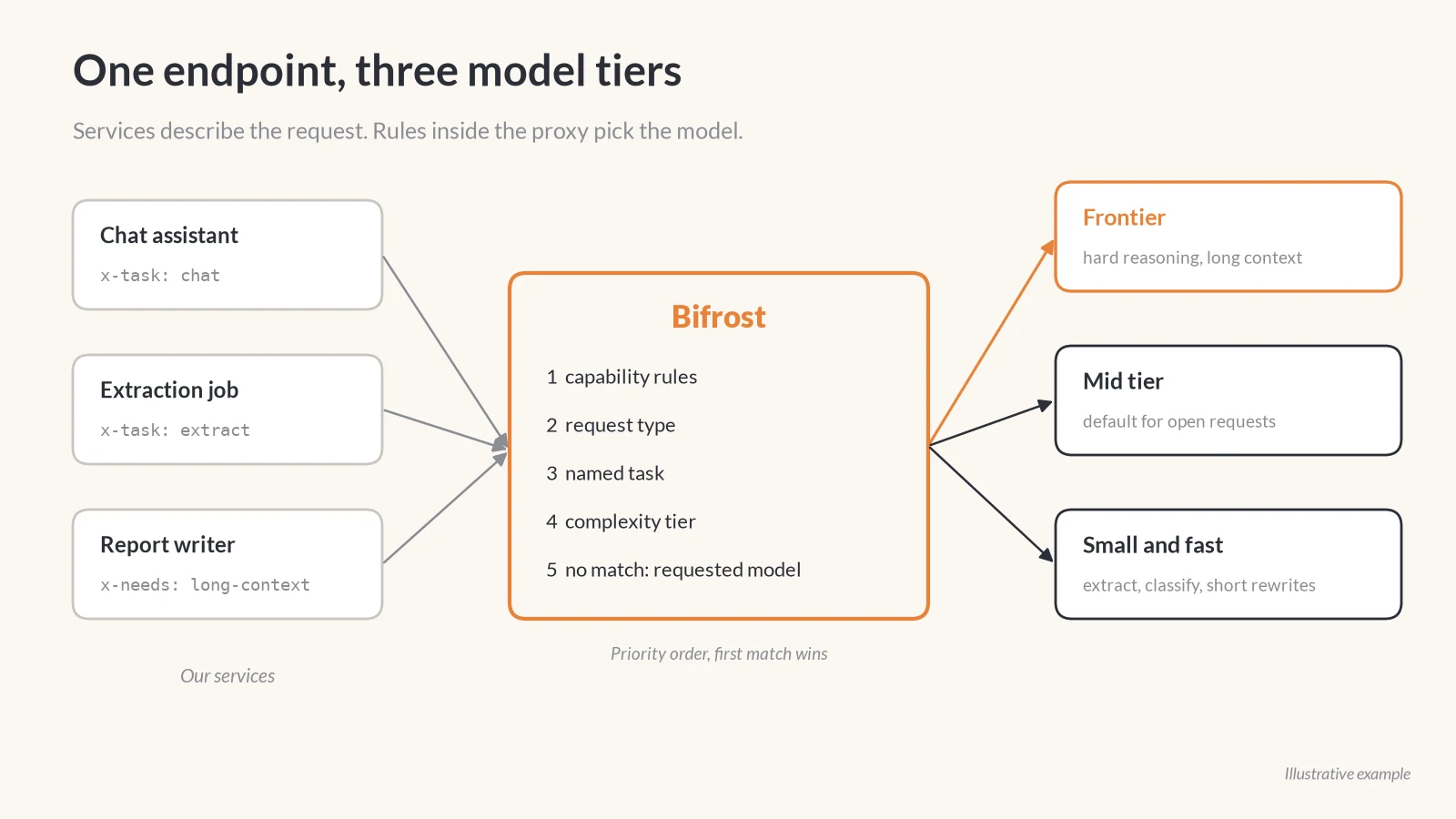
Bifrost rules do not count tokens or inspect tool definitions, so anything a rule needs to know about the request has to arrive as a header. In a setup like this, the caller adds a few before sending: what kind of task it is, whether it carries images, whether it needs tool calls, and a rough size of the input. The header names are yours to choose. The caller knows these facts for free. A proxy would have to guess them.
The order to check things in
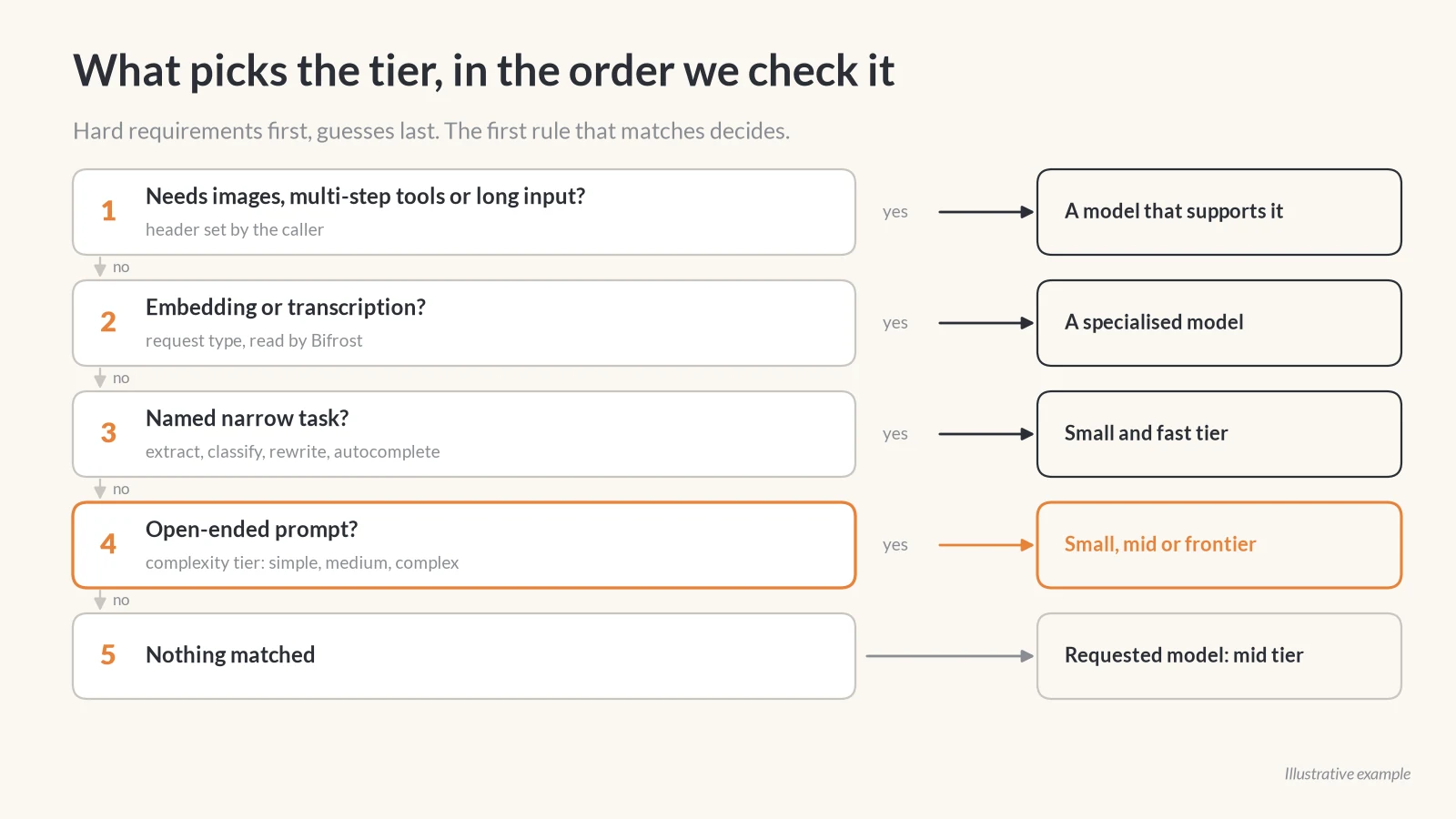
The rules work best when they run from hard requirements to soft preferences.
- Capabilities. If the request carries images, needs reliable tool calls across several steps, or has a long input, only some models can do it at all. These rules come first, so a quick label task with a screenshot attached never lands on a text-only model.
- Request type. Embeddings and transcriptions go to models built for them. Bifrost exposes the request type directly, so this needs no header.
- Known task. When the caller names a narrow task such as extraction, classification or a short rewrite, it can go to the small tier.
- Complexity. For open-ended prompts, typically chat with a person on the other end, Bifrost can classify the prompt itself. More on that below.
- Default. Anything left goes to the model the caller requested. A mid tier model is a sensible choice for that default.
Latency belongs in the task signal too. A request that blocks a person typing, such as an autocomplete, can be marked as a narrow task and kept on the small tier even when a bigger model might phrase it slightly better. A report that runs in the background can wait for the frontier model.
Letting Bifrost judge the open-ended prompts
For prompts nobody labelled, Bifrost offers a complexity router (opens in a new tab). It embeds the latest user message, compares it with reference phrases labelled simple, medium and complex, and gives the request the tier of the nearest one. That tier becomes a variable the rules can read:
complexity_tier == "COMPLEX"
complexity_tier == "SIMPLE" && request_type == "chat_completion"
Two details matter more than the setup. First, when the classifier is unsure, times out, or gets a prompt that mixes text and images, it publishes no tier. A rule that needs a tier then does not match, and the request falls through to the next rule. Nothing gets blocked by a guess. Second, the default reference phrases are generic, and the docs say plainly that adding phrases drawn from your own prompts helps more than any other tuning. If you turn it on, replace a good share of the defaults with real requests from your own apps, with anything identifying removed.
Bifrost can also hold a conversation’s tier steady. With session-aware routing on, a chat that reaches the complex tier stays there, and an easy follow-up like “thanks, shorten it” does not drop it back to a small model halfway through.
When the small model gets it wrong
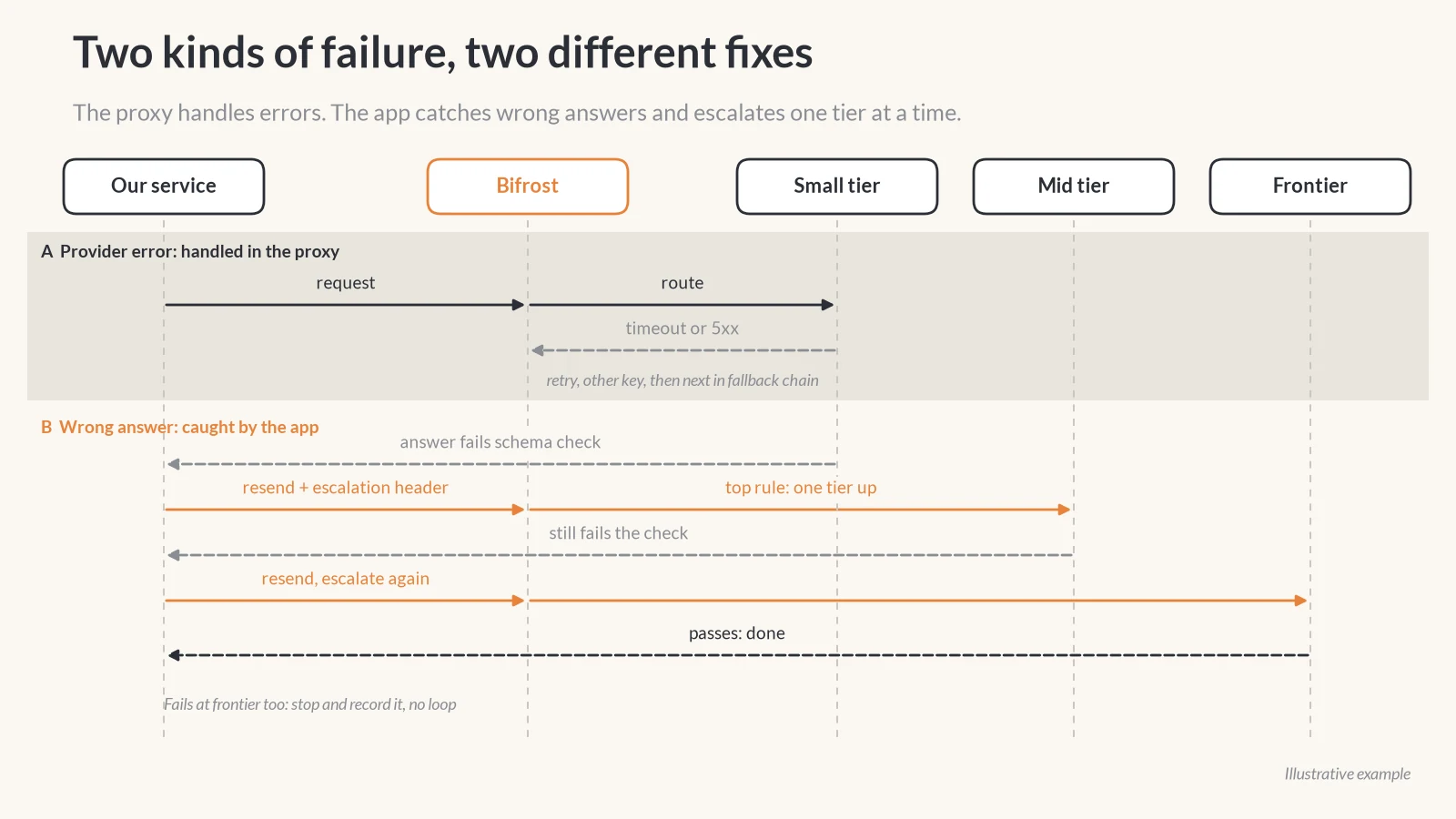
Two different things can go wrong, and they need two different fixes.
The first is that the model never answers: a timeout, a rate limit, a provider outage. Bifrost handles this one. It retries, rotates to another key if one is configured, and then works through the rule’s fallback chain until a provider answers.
The second is that the model answers, and the answer is wrong. The JSON does not match the schema, a required field is empty, or the tool call names a tool that does not exist. Bifrost cannot see that, because to a gateway a wrong answer looks like a successful one. So the check has to live in the app. When it fails, the app can send the same request again with an escalation header, and a top-priority rule can send anything carrying that header one tier up. If the mid tier fails the same check, the next attempt goes to the frontier model. If that fails too, the app should stop and record it instead of looping.
This only works when the check is mechanical. A schema, a list of allowed labels, a tool name that has to exist: those are easy to test. “Is this summary good?” is not, so tasks without a mechanical check are better started on the mid tier.
It is the same lesson as making machines stop lying before an AI reads their data. Decide what a valid message looks like, and check every one.
If you are setting this up
- Start with one rule that sends only clearly hard work to the frontier model, and leave everything else where it is. Widen from there.
- Put capability rules above everything else. A wrong guess on difficulty gives a weaker answer. A wrong guess on vision support fails the whole request.
- Let the caller describe the request in headers. The app knows what it is asking for, and the proxy should not have to guess.
- Keep provider fallbacks and quality escalation apart. The first lives in the proxy, the second needs a check only the app can run.
- Read the routing logs. Bifrost records which rule matched and, for complexity routing, which reference phrase won. That is where misrouted requests show up.
If you are running AI features in production and want a second opinion on how requests reach your models, tell us.